What this tool does
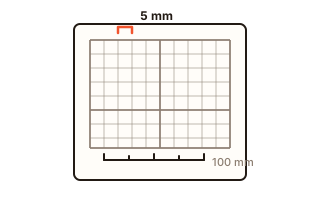
This generator makes graph paper you print at home or at school. The common US grids are one click away: quarter-inch squares with a heavier line every inch, five squares per inch, and metric 5 mm, 10 mm and 1 mm engineering paper. Any other size from 1 to 50 mm (about 0.04 to 2 inches) can be typed in.
Besides square grids there are seven more patterns: dot grid paper for bullet journals and lettering, isometric paper with lines or dots for drawing objects in three dimensions, hexagon paper for game maps and chemistry, lined paper, polar paper with rings and rays, and blank music staff paper.
The PDF is vector, so every line is as sharp as your printer allows. The grid always holds whole cells and sits in the middle of the page; with a heavier line it rounds to whole blocks, so no square is cut off at the edge. It is all drawn inside your browser, and no font file is needed or downloaded.
How to use it
- Choose a pattern at the top. For square paper, the quick picks give you 1/4 inch, 1/5 inch, 5 mm, 10 mm and 1 mm engineering grids.
- To set your own size, type it in. Switch the unit between inches and millimetres; the check bar at the bottom follows the unit.
- Pick the heavier-line spacing, line weight, colour, paper size and orientation, and the margin.
- Check the cell count and grid size under the preview, then press "Download PDF". Use PNG (300 dpi) for an image.
- In the print dialog choose "Actual size" or 100%, print, and measure the bar at the bottom: if it is exactly 4 inches, the squares are exactly the size you chose.
Why printed squares come out a little small
Most print dialogs start on "Fit to page", which shrinks the whole sheet a few percent to stay clear of the edge the printer cannot reach. Quarter-inch squares then measure closer to 0.24 inch. Setting the scale to 100% or "Actual size" prints the PDF at its true size.
That is why the sheet carries a check bar: four inches with a tick every half inch (or 100 mm with a tick every centimetre on metric paper), next to the cell size. Lay a ruler on it. If it reads exactly four inches the grid is right; if it is short, change the print scale and print again. The bar can be switched off.
Which pattern for what
Quarter-inch and 5 mm squares are the classic choice for math homework, plotting graphs and keeping handwriting straight. Large 10 mm or half-inch squares suit young children and big diagrams; 1 mm engineering paper with 10 mm blocks suits technical drawings.
Dot grids guide without getting in the way, which is why bullet journals use them. Isometric paper helps you draw cubes and furniture at 30 degrees, and hexagon paper gives every cell six neighbours for strategy game maps. Staff paper has 2 mm between lines by default; widen it for beginners.
Your data
The paper is drawn in this browser and nothing is sent anywhere. Only your settings are kept in this browser for next time. No font file is needed or downloaded.
Questions and answers
My printed squares are slightly smaller than 1/4 inch.
The print dialog is set to fit the page. Choose "Actual size" or a scale of 100% and print again, then measure the check bar: it should be exactly 4 inches.
Can I make dot grid paper for a bullet journal?
Yes. Choose the dot grid, switch the unit to mm and set 5 for the usual bullet journal spacing; A5 paper fits most journals.
Does it work on a black-and-white printer?
Yes. The default grey prints as a light grey that does not compete with your writing, and colours print as greys. If the lines are too faint, choose the bold line weight.
Is there a limit on how many sheets I can print?
No. Download the PDF once and print as many copies as you need.