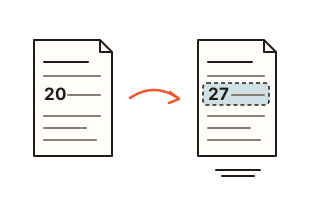
What this tool does
Someone sends you a PDF and one thing in it is wrong: the date of a meeting, an amount on a quote, a misspelled name. The Word file it came from is nowhere to be found, and the online editors that change existing text usually want the file uploaded first. This tool opens the PDF in your browser, shows each page as it is, and lets you click a line to replace it on the spot. Nothing to install, no account.
The default way, rewrite, removes the text objects that drew the line from the page and writes the new words starting at the same point, in the same size and colour. When you save, the leftovers the PDF engine keeps around are dropped from the file as well, so copying or searching the saved PDF finds the new words only.
If every character you type already appears in the document in that font, the original font is reused. When a character is missing from it, the line is written in Nanum Gothic or Nanum Myeongjo, and only the characters used are embedded, so the file barely grows. Form fields in the PDF can be filled right on the page.
How to use it
- Choose a PDF or drop it on the box. The first time, the editing engine downloads once; after that your browser keeps it.
- Click the line you want to change. Every line you can edit has a faint tint.
- Type the new words in the box that opens and press Replace. To remove the line altogether, press Delete line.
- Undo takes back your last text change. When you are done, press Save to download the edited copy; your original file is left as it was.
Rewrite or cover: what is the difference?
Rewrite removes the old words and writes the new ones. Both the page and the file then hold only the new text. Use it for anything you send on to someone else.
Cover puts a box in the background colour over the old words and writes on top. The page shows the new text, but the old words are still inside the file and turn up if someone copies or searches the text. Some programs put page text inside a grouped drawing (a form XObject) that cannot be rewritten; for those lines the tool tells you only cover is possible.
What it cannot do
It cannot fetch the commercial font the document was made with. A PDF usually carries only the characters it shows, so a character it lacks is written in a Nanum font instead.
Paragraphs are not reflowed: you edit one line at a time, and a longer line is scaled down to fit the old width. Scanned PDFs are pictures of paper with no text to edit until it is recognised (OCR). Saving an edited PDF breaks any digital signature in it, and password-protected PDFs are not opened.
Before you change a document
Changing the name, date or amount on a certificate, contract or receipt someone else issued and passing it off as the original can be forgery. Edit your own documents, or ones you have permission to change. This tool is not meant for hiding that a change was made.
Your data
The PDF is opened and edited inside this browser and is never uploaded. Only the editing engine and the Nanum fonts come from this site. Your font choice and the fit-to-width setting are remembered in this browser for next time.
Questions and answers
Are the original words really gone from the edited PDF?
For lines changed with rewrite, yes: their text objects are taken off the page, and unused leftovers are dropped from the file when you save, so copy and search no longer find them. Lines changed with cover keep the old words under the box.
Why does the new text look slightly different?
The original font in the file did not have one of the characters you typed, so the line was written in Nanum Gothic or Nanum Myeongjo. Changing only characters the document already shows, such as digits, keeps the original font. A line that mixes fonts, such as a bold label followed by plain text, is also written in one Nanum face. You can also pick the font in the box.
Will a whole paragraph reflow if I change it?
No. Lines are edited one at a time. A new line that is longer than the old one is made smaller to fit the old width; turn off Fit to the old width to let it run on instead.
Can I edit a scanned PDF?
A scan is a photo of a page, so there is no text to click. Take a screenshot of the page and drop it into Image to text to pull the words out (it takes pictures, not PDF files). Pages like that are marked with a note.
Can I fill in the form fields of a PDF?
Yes. Text boxes, check boxes and drop-down lists appear on the page; type or pick and save. The values are drawn with an embedded font, so other PDF readers show them too.